Welcome to Google Accounts. To activate your account and verify your email
address, please click the following link:
https://accounts.google.com/VE?c=CMC-2ay5oo2AzgEQ6-OQ0_jh2fWhAQ&hl=en
***NOTE*** Please print this page for your records. You'll need your
verification link if you lose access to your account (for example,
if you forget your username or password).
If you've received this mail in error, it's likely that another user
entered your email address while trying to create an account for a different
email address. If you don't click the verification link, the account won't
be activated.
If you didn't request this email, but you decide to use this account,
or delete it, you'll first need to reset the account password by
entering your email address at
https://accounts.google.com/RecoverAccount.
If clicking the link above does not work, copy and paste the URL in a
new browser window instead.
Sincerely,
The Google Accounts Team
Note: This email address cannot accept replies. To fix an issue or learn
more
about your account, visit our help center:
http://www.google.com/support/accounts/
Jumat, 17 Januari 2014
Jumat, 10 Januari 2014
Gmail update: Reach more people you know
Gmail update: Reach more people you know
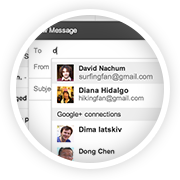
Ever wanted to email someone you know, but haven't yet exchanged email addresses? Starting this week, when you're composing a new email, Gmail will suggest your Google+ connections as recipients, even if you haven't exchanged email addresses yet.
How it works with email addresses
Emailing Google+ connections works a bit differently to protect the privacy of email addresses. Your email address isn't visible to your Google+ connections until you send them an email, and their email addresses are not visible to you until they respond.
Receiving email from people outside your circles
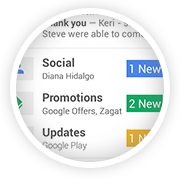
If you receive an email from someone outside your circles, it will be filtered into the Social category of the inbox (if enabled) and only after you respond or add them to your circles, can they start another conversation with you.
How to control who can contact you
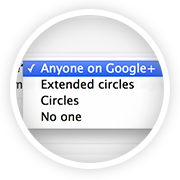
You're in control of whether people can reach you with a new setting in Gmail on the desktop. To learn more, check out the Help Center.

The Gmail Team
© 2013 Google Inc. 1600 Amphitheatre Parkway, Mountain View, CA 94043
You have received this mandatory email service announcement to update you about important changes to your Gmail product or account.
You have received this mandatory email service announcement to update you about important changes to your Gmail product or account.


Kamis, 09 Januari 2014
Google Email Verification
Welcome to Google Accounts. To activate your account and verify your email
address, please click the following link:
https://accounts.google.com/VE?c=CMufv-mCrpzyARC-wa-h58zbj1I&hl=en
***NOTE*** Please print this page for your records. You'll need your
verification link if you lose access to your account (for example,
if you forget your username or password).
If you've received this mail in error, it's likely that another user
entered your email address while trying to create an account for a different
email address. If you don't click the verification link, the account won't
be activated.
If you didn't request this email, but you decide to use this account,
or delete it, you'll first need to reset the account password by
entering your email address at
https://accounts.google.com/RecoverAccount.
If clicking the link above does not work, copy and paste the URL in a
new browser window instead.
Sincerely,
The Google Accounts Team
Note: This email address cannot accept replies. To fix an issue or learn
more
about your account, visit our help center:
http://www.google.com/support/accounts/
address, please click the following link:
https://accounts.google.com/VE?c=CMufv-mCrpzyARC-wa-h58zbj1I&hl=en
***NOTE*** Please print this page for your records. You'll need your
verification link if you lose access to your account (for example,
if you forget your username or password).
If you've received this mail in error, it's likely that another user
entered your email address while trying to create an account for a different
email address. If you don't click the verification link, the account won't
be activated.
If you didn't request this email, but you decide to use this account,
or delete it, you'll first need to reset the account password by
entering your email address at
https://accounts.google.com/RecoverAccount.
If clicking the link above does not work, copy and paste the URL in a
new browser window instead.
Sincerely,
The Google Accounts Team
Note: This email address cannot accept replies. To fix an issue or learn
more
about your account, visit our help center:
http://www.google.com/support/accounts/
Google Email Verification
Welcome to Google Accounts. To activate your account and verify your email
address, please click the following link:
https://accounts.google.com/VE?c=CK2fhNLuiqmhZhCh85X64tiJ-iY&hl=en
***NOTE*** Please print this page for your records. You'll need your
verification link if you lose access to your account (for example,
if you forget your username or password).
If you've received this mail in error, it's likely that another user
entered your email address while trying to create an account for a different
email address. If you don't click the verification link, the account won't
be activated.
If you didn't request this email, but you decide to use this account,
or delete it, you'll first need to reset the account password by
entering your email address at
https://accounts.google.com/RecoverAccount.
If clicking the link above does not work, copy and paste the URL in a
new browser window instead.
Sincerely,
The Google Accounts Team
Note: This email address cannot accept replies. To fix an issue or learn
more
about your account, visit our help center:
http://www.google.com/support/accounts/
address, please click the following link:
https://accounts.google.com/VE?c=CK2fhNLuiqmhZhCh85X64tiJ-iY&hl=en
***NOTE*** Please print this page for your records. You'll need your
verification link if you lose access to your account (for example,
if you forget your username or password).
If you've received this mail in error, it's likely that another user
entered your email address while trying to create an account for a different
email address. If you don't click the verification link, the account won't
be activated.
If you didn't request this email, but you decide to use this account,
or delete it, you'll first need to reset the account password by
entering your email address at
https://accounts.google.com/RecoverAccount.
If clicking the link above does not work, copy and paste the URL in a
new browser window instead.
Sincerely,
The Google Accounts Team
Note: This email address cannot accept replies. To fix an issue or learn
more
about your account, visit our help center:
http://www.google.com/support/accounts/
Google Email Verification
Welcome to Google Accounts. To activate your account and verify your email
address, please click the following link:
https://accounts.google.com/VE?c=CMfRot-t0c-7FBDe9Ijv2YiV-TE&hl=en
***NOTE*** Please print this page for your records. You'll need your
verification link if you lose access to your account (for example,
if you forget your username or password).
If you've received this mail in error, it's likely that another user
entered your email address while trying to create an account for a different
email address. If you don't click the verification link, the account won't
be activated.
If you didn't request this email, but you decide to use this account,
or delete it, you'll first need to reset the account password by
entering your email address at
https://accounts.google.com/RecoverAccount.
If clicking the link above does not work, copy and paste the URL in a
new browser window instead.
Sincerely,
The Google Accounts Team
Note: This email address cannot accept replies. To fix an issue or learn
more
about your account, visit our help center:
http://www.google.com/support/accounts/
address, please click the following link:
https://accounts.google.com/VE?c=CMfRot-t0c-7FBDe9Ijv2YiV-TE&hl=en
***NOTE*** Please print this page for your records. You'll need your
verification link if you lose access to your account (for example,
if you forget your username or password).
If you've received this mail in error, it's likely that another user
entered your email address while trying to create an account for a different
email address. If you don't click the verification link, the account won't
be activated.
If you didn't request this email, but you decide to use this account,
or delete it, you'll first need to reset the account password by
entering your email address at
https://accounts.google.com/RecoverAccount.
If clicking the link above does not work, copy and paste the URL in a
new browser window instead.
Sincerely,
The Google Accounts Team
Note: This email address cannot accept replies. To fix an issue or learn
more
about your account, visit our help center:
http://www.google.com/support/accounts/
Google Email Verification
Welcome to Google Accounts. To activate your account and verify your email
address, please click the following link:
https://accounts.google.com/VE?c=CNavnYyPks7ZugEQiMTNg7zyz6nmAQ&hl=en
***NOTE*** Please print this page for your records. You'll need your
verification link if you lose access to your account (for example,
if you forget your username or password).
If you've received this mail in error, it's likely that another user
entered your email address while trying to create an account for a different
email address. If you don't click the verification link, the account won't
be activated.
If you didn't request this email, but you decide to use this account,
or delete it, you'll first need to reset the account password by
entering your email address at
https://accounts.google.com/RecoverAccount.
If clicking the link above does not work, copy and paste the URL in a
new browser window instead.
Sincerely,
The Google Accounts Team
Note: This email address cannot accept replies. To fix an issue or learn
more
about your account, visit our help center:
http://www.google.com/support/accounts/
address, please click the following link:
https://accounts.google.com/VE?c=CNavnYyPks7ZugEQiMTNg7zyz6nmAQ&hl=en
***NOTE*** Please print this page for your records. You'll need your
verification link if you lose access to your account (for example,
if you forget your username or password).
If you've received this mail in error, it's likely that another user
entered your email address while trying to create an account for a different
email address. If you don't click the verification link, the account won't
be activated.
If you didn't request this email, but you decide to use this account,
or delete it, you'll first need to reset the account password by
entering your email address at
https://accounts.google.com/RecoverAccount.
If clicking the link above does not work, copy and paste the URL in a
new browser window instead.
Sincerely,
The Google Accounts Team
Note: This email address cannot accept replies. To fix an issue or learn
more
about your account, visit our help center:
http://www.google.com/support/accounts/
Langganan:
Postingan (Atom)